By Tanvir · 30 Jul 2026
AI Agents for Business Workflows: Practical Use Cases for Startups


Learn how startups can use AI agents for sales, support, onboarding, operations, finance, and other multistep business workflows.
Startups can use AI agent development for business workflows to move beyond one-time AI prompts and automate controlled sequences of work. An agent can receive a goal, gather information, use approved business tools, complete defined steps, request human approval, and record what happened.
The strongest use cases are not vague instructions such as “run the business.” They are narrow, repeatable workflows with clear inputs, permitted actions, measurable outcomes, and a reliable path for escalating exceptions to a person.
Quick Answer
AI agents help startups manage multistep workflows that require both interpretation and action.
Unlike a basic chatbot that only answers a question, a business workflow agent may review an incoming request, retrieve account information, update a CRM record, create a task, draft a response, and ask an employee to approve the final action.
Practical startup use cases include:
- Lead qualification and sales follow-up
- Customer service triage
- Client onboarding
- Document and invoice processing
- Internal knowledge retrieval
- Project status coordination
- Order exception management
- Recurring reporting
- Vendor and administrative workflows
The best first agent handles one narrow workflow, uses limited permissions, produces a verifiable result, and keeps a person involved when the decision is important or uncertain.
Key Takeaways
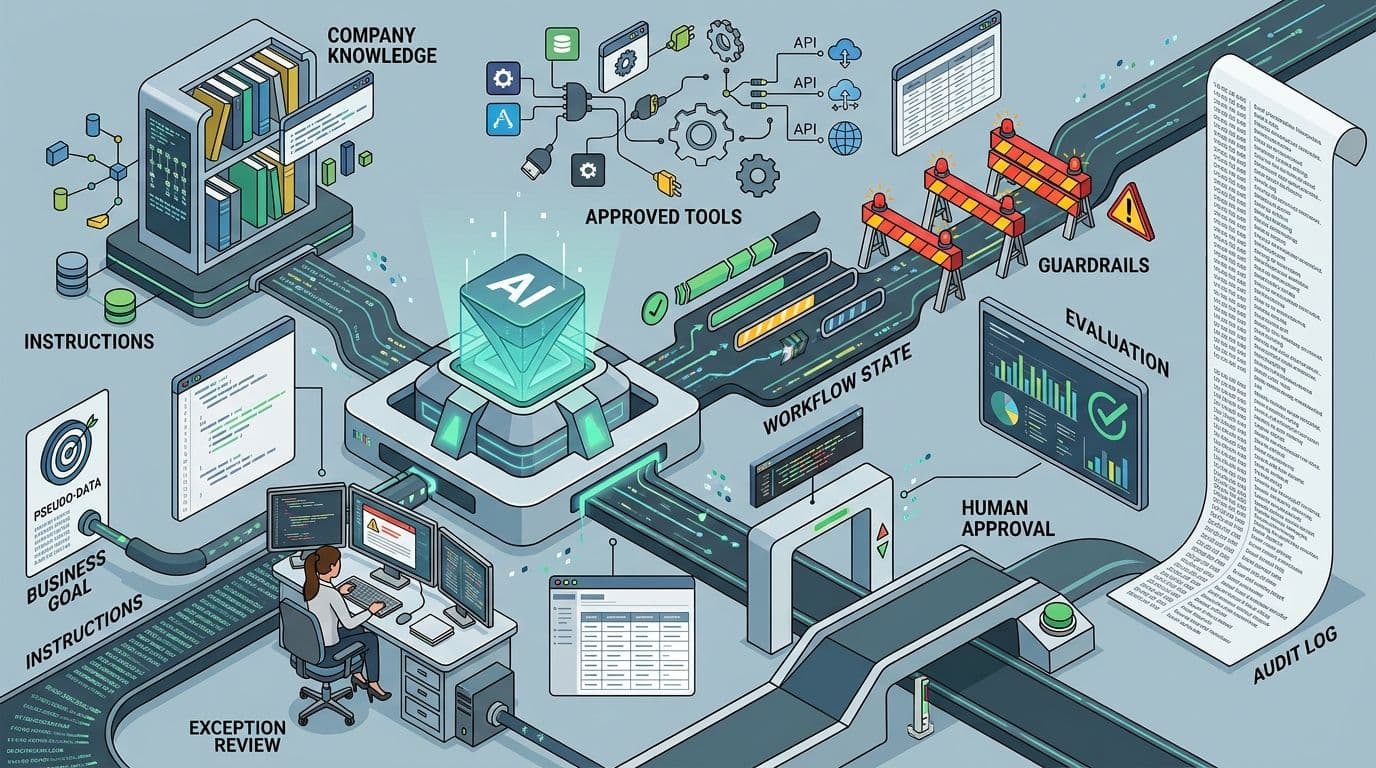
- An AI agent combines a model with instructions, tools, data, workflow state, and control rules.
- Agents are most useful when a task requires several connected steps rather than one generated answer.
- Startups should automate a defined workflow, not assign an agent an unrestricted business function.
- The agent should use only the data and tools required for its assigned job.
- Human approval should remain in place for financial, customer-impacting, employment-related, destructive, or difficult-to-reverse actions.
- A simple single-agent system is usually a better starting point than a complex network of specialized agents.
- Agent quality must be evaluated across the complete workflow, including tool use, decisions, handoffs, and final outcomes.
- The startup should track completion rate, exception rate, employee corrections, response time, operating cost, and business impact.
- Production agents require monitoring, audit records, access management, and a documented manual fallback.
What Is an AI Agent in a Business Workflow?
An AI agent is a software system that can work toward a defined goal by interpreting information, deciding what step to take next, and using approved tools to complete actions.
A business agent may be able to:
- Read an email or form submission
- Search an approved knowledge base
- Retrieve information from a CRM
- Review a document
- Classify a request
- Compare information with business rules
- Update a record
- Create a task
- Draft a response
- Request approval
- Send a notification
- Monitor whether the process was completed
The OpenAI guide to building AI agents describes an agent as a system that independently completes tasks on a user’s behalf by managing workflow execution and using tools within defined guardrails.
The key distinction is that an agent does not only generate content. It can participate in a process.
AI Agent vs Chatbot vs Workflow Automation
These systems can overlap, but they are not identical.
| System Type | Primary Function | Typical Behavior | Suitable Example |
|---|---|---|---|
| Chatbot | Respond to a user | Answers or generates content after receiving a prompt | Answering a product question |
| Rules-based automation | Execute predefined instructions | Follows fixed if-this-then-that logic | Creating a CRM contact after a form submission |
| AI assistant | Help a person complete a task | Drafts, summarizes, retrieves, or recommends | Preparing a sales email for review |
| AI agent | Complete a defined multistep goal | Interprets inputs, selects actions, uses tools, and manages workflow state | Qualifying a lead, updating the CRM, and assigning follow-up |
| Multi-agent system | Coordinate specialized agent roles | Delegates parts of a larger process among agents | One agent gathers data while another validates and prepares an output |
A chatbot may tell a salesperson what to do next. An agent may create the task, update the opportunity, prepare the email, and notify the salesperson that approval is required.
A conventional automation is usually more predictable because every step has already been specified. An agent is useful when part of the workflow requires interpretation, adaptive decisions, or tool selection.
The Anatomy of a Reliable Business Agent
A dependable agent requires more than a model and a prompt.
A Defined Goal
The agent needs a specific business outcome.
A weak goal is:
Handle customer service.
A more useful goal is:
Review new support tickets, identify the issue category and urgency, retrieve relevant account and policy information, prepare a response, and route uncertain or high-impact cases to a support representative.
The second goal defines the workflow without giving the agent unlimited authority.
Clear Instructions
Instructions explain:
- What the agent is responsible for
- What information it should use
- Which rules it must follow
- What it may and may not do
- When it should stop
- When it must involve a person
- What a successful result looks like
Instructions should reflect actual business procedures rather than generic prompts.
Approved Tools
Tools allow the agent to interact with business systems.
Possible tools include:
- CRM search and update functions
- Customer support platforms
- Email and messaging systems
- Scheduling software
- Databases
- Accounting applications
- Document repositories
- Project management tools
- Internal APIs
- E-commerce systems
An agent should not receive access to an entire system when it only needs permission to read or update a limited set of records.
Relevant Context
The agent may require:
- Customer information
- Product documentation
- Account history
- Current workflow status
- Pricing rules
- Support policies
- Approved templates
- Previous actions
- Organization-specific terminology
Giving an agent more information is not automatically better. The context should be relevant, current, authorized, and organized around the assigned task.
Workflow State
Multistep work requires the agent to know what has already happened.
The workflow state may record:
- The request received
- Information retrieved
- Actions attempted
- Decisions made
- Missing information
- Approvals requested
- Employee corrections
- Final outcome
Without reliable state management, an agent may repeat actions, lose context, or continue after the task should have stopped.
Guardrails
Guardrails define operational boundaries.
Examples include:
- Never send a refund without approval.
- Do not change a customer’s subscription unless identity is verified.
- Do not use information outside approved company sources.
- Do not create a payment above a defined amount.
- Escalate complaints involving threats, safety, or legal demands.
- Do not delete a record.
- Stop after two failed integration attempts.
- Ask for human review when required information is missing.
Evaluation
The startup must be able to determine whether the agent completed the workflow correctly.
Evaluation may examine:
- Whether the correct tools were used
- Whether required information was retrieved
- Whether the business rules were followed
- Whether the final output was accurate
- Whether an unnecessary action was taken
- Whether the agent escalated the right cases
- Whether the workflow completed on time
- Whether the result required employee correction
Anthropic’s guidance on building effective AI agents recommends beginning with the simplest solution that can meet the need and adding agentic complexity only when it produces measurable improvement. It also emphasizes clear success criteria, feedback loops, and meaningful human oversight.
Human Handoff
A reliable agent must know when to transfer control.
The handoff should include enough context for the employee to continue without repeating the entire investigation.
A useful handoff may contain:
- Summary of the request
- Information reviewed
- Actions completed
- Uncertainty identified
- Recommended next step
- Relevant records
- Reason approval is required
Practical AI Agent Use Cases for Startups
The best agent use cases usually combine repeated work, variable inputs, several business systems, and a result that can be checked.
1. Lead Qualification and CRM Follow-Up
Startups often receive leads through forms, chat, email, referrals, webinars, advertising platforms, and downloadable resources.
A lead agent can:
- Receive the inquiry.
- Check whether the contact already exists.
- Identify the company, role, requested service, and urgency.
- Compare the inquiry with qualification rules.
- Add or update the CRM record.
- Assign the appropriate sales owner.
- Prepare a personalized response.
- Create a follow-up task.
- Notify the salesperson.
- Escalate high-value or unusual opportunities.
What should remain human-led?
A salesperson should usually remain responsible for:
- Final qualification of strategic opportunities
- Pricing commitments
- Negotiation
- Relationship development
- Sensitive account decisions
- Final customer communication when accuracy is critical
Useful success metrics
- Time from inquiry to first action
- Percentage of leads correctly routed
- CRM completion rate
- Lead response time
- Employee corrections
- Qualified opportunity rate
- Follow-up completion rate
2. Customer Support Triage and Resolution Preparation
A support agent can perform more than basic ticket classification.
It may:
- Identify the customer
- Determine the issue category
- Assess urgency
- Retrieve account history
- Search approved support documentation
- Identify previous troubleshooting steps
- Prepare a recommended response
- Update the support ticket
- Route the request to the correct team
- Ask for approval before sending
A support agent can also identify missing information and request it before an employee begins investigating the case.
Suitable agent boundary
The agent can resolve routine, low-risk requests when the approved answer and required action are clear.
It should escalate:
- Account security concerns
- Payment disputes
- Cancellation complaints
- Threats or abusive content
- Safety issues
- Repeated failures
- Unclear policies
- High-value customers
- Requests outside its approved knowledge
Useful success metrics
- Time to first meaningful response
- Routing accuracy
- Resolution rate
- Escalation accuracy
- Reopened ticket rate
- Customer satisfaction
- Average employee handling time
3. Customer Onboarding Coordination
Onboarding often becomes fragmented as a startup grows.
Information may be spread across signed agreements, emails, CRM records, project management tools, forms, shared folders, billing systems, and internal messages.
An onboarding agent can:
- Confirm that required agreements are complete.
- Collect missing account information.
- Create the customer workspace.
- Assign internal tasks.
- Schedule the kickoff process.
- Prepare a customer-specific checklist.
- Send approved onboarding instructions.
- Monitor task completion.
- Remind responsible employees.
- Escalate delays or missing information.
The agent coordinates the process, while employees remain responsible for relationship management, strategic planning, and decisions that affect scope or commitments.
Useful success metrics
- Time from signed agreement to kickoff
- Missing-information rate
- Onboarding completion time
- Internal task completion rate
- Number of manual follow-ups
- Customer activation rate
- Delayed onboarding cases
4. Invoice and Expense Exception Handling
A finance workflow may involve email attachments, accounting records, purchase orders, approvals, vendor information, and payment status.
An agent can:
- Retrieve an incoming invoice
- Identify the vendor
- Extract required information
- Check for duplicate submissions
- Compare the invoice with a purchase order
- Verify approval requirements
- Flag missing or unusual information
- Create an accounting draft
- Route the record to the correct approver
- Track whether the exception was resolved
The agent should not receive unrestricted authority to send payments.
Human approval should be required for:
- New vendors
- Changed banking details
- Duplicate payment concerns
- Unusually large amounts
- Missing purchase orders
- Policy exceptions
- Cross-border payment issues
- Final payment release
Useful success metrics
- Invoice processing time
- Data extraction accuracy
- Duplicate detection
- Exception rate
- Approval time
- Employee corrections
- Late-payment frequency
5. Internal Knowledge and Operations Support
Startup employees often spend time searching for information across shared drives, documentation platforms, messaging tools, project records, and internal wikis.
A knowledge agent can:
- Interpret an employee’s question
- Search approved internal sources
- retrieve the most relevant information
- Cite the underlying records
- Summarize the applicable process
- Identify when documentation conflicts
- Create a follow-up task for the document owner
- Escalate questions that lack an approved answer
This use case is most effective when internal documentation is current and ownership is clear.
The agent should distinguish between:
- An approved company policy
- A draft document
- An outdated procedure
- A discussion in a messaging channel
- An employee’s personal notes
Useful success metrics
- Time spent searching
- Percentage of answers linked to approved sources
- Employee correction rate
- Unanswered question rate
- Documentation gaps identified
- Repeat question frequency
6. Project Status and Delivery Coordination
Project updates often depend on employees manually checking several systems and contacting people for progress reports.
A project coordination agent can:
- Review task status
- Identify overdue work
- Summarize recent changes
- Detect unresolved blockers
- Request updates from task owners
- Prepare a weekly status report
- Update risk records
- Notify the project manager
- Schedule follow-up tasks
- Identify dependencies that may affect delivery
The agent should not make unapproved commitments to customers or change project scope.
Useful success metrics
- Time spent preparing status reports
- Overdue task visibility
- Blocker response time
- Missing-update frequency
- Project manager corrections
- On-time milestone rate
7. E-Commerce and Order Exception Management
A growing e-commerce business may need to coordinate orders, inventory, payments, shipping, returns, customer messages, and vendor information.
An agent can:
- Identify delayed or incomplete orders
- Retrieve fulfillment status
- Check inventory availability
- Review approved shipping options
- Prepare a customer update
- Create a support task
- Flag potential duplicate orders
- Route return requests
- Identify orders requiring manual intervention
- Monitor whether the issue was resolved
The agent may handle routine status updates, but refunds, replacements, pricing exceptions, and account restrictions should follow defined approval rules.
Useful success metrics
- Order exception resolution time
- Customer notification time
- Support ticket volume
- Routing accuracy
- Refund approval time
- Employee handling time
- Repeat customer contacts
8. Recruiting Administration
An agent can support administrative parts of recruiting without making final employment decisions.
It may:
- Confirm that an application is complete
- Organize candidate materials
- Schedule interviews
- Send approved reminders
- Prepare interview packets
- Collect interviewer feedback
- Track next steps
- Update candidate status after human approval
- Identify missing evaluation forms
The agent should not independently make hiring, rejection, compensation, or employment eligibility decisions.
Useful success metrics
- Scheduling time
- Missing-feedback rate
- Candidate response time
- Interview coordination effort
- Administrative corrections
- Time between hiring stages
9. Founder and Market Research Briefing
Founders frequently need information from customer feedback, competitor materials, internal sales calls, product analytics, and market sources.
A research agent can:
- Collect approved source material
- Organize information by question
- Extract recurring themes
- Identify conflicting evidence
- Prepare a structured briefing
- Link conclusions to the original material
- Record unanswered questions
- Create follow-up research tasks
The agent’s output should be treated as a research aid rather than unquestioned evidence. Source quality, freshness, and uncertainty should remain visible.
Useful success metrics
- Research preparation time
- Source coverage
- Unsupported claim rate
- Founder corrections
- Reuse of research outputs
- Questions resolved
10. Renewal and Account Health Monitoring
Subscription businesses may need to monitor usage, support history, payment status, customer feedback, and upcoming renewal dates.
An account agent can:
- Identify upcoming renewals
- Gather approved account information
- Summarize product usage
- Review unresolved support issues
- Identify missing contacts
- Prepare an account brief
- Create renewal tasks
- Notify the account owner
- Draft an approved outreach message
A customer success employee should review recommendations before contacting important or at-risk accounts.
Useful success metrics
- Renewal preparation time
- Accounts reviewed before renewal
- Missing-contact rate
- At-risk accounts identified
- Customer success corrections
- Renewal completion rate

How to Identify a Strong First Agent Use Case
The first agent should not be selected because it sounds impressive. It should be selected because the workflow has a clear business problem and can be tested safely.
The Workflow Happens Frequently
A process that occurs every day or week usually creates more learning and value than an uncommon task.
Frequent workflows also provide enough examples for testing.
The Inputs Vary but Follow Recognizable Patterns
A fixed rule may be sufficient when every input is identical.
An agent becomes more useful when the input varies, but the business can still describe:
- Common categories
- Required information
- Expected outcomes
- Known exceptions
- Escalation rules
The Agent Needs to Use More Than One Tool
A strong agent use case often crosses several systems.
For example, the agent may need to:
- Read an email
- Retrieve a CRM record
- Search a policy
- Create a task
- Prepare a response
A simple one-step action may be better handled through conventional automation.
Success Can Be Verified
The startup should be able to tell whether the agent completed the task correctly.
A verifiable outcome may be:
- The lead was assigned to the correct salesperson.
- The required onboarding tasks were created.
- The invoice fields matched the source document.
- The support ticket was routed to the correct queue.
- The project report included all active blockers.
- The agent escalated a policy exception.
Mistakes Are Reversible or Contained
A strong first use case should allow the startup to correct an error without creating serious damage.
Preparing a draft is safer than sending an irreversible message. Creating an accounting entry for approval is safer than releasing payment.
The Workflow Has a Clear Owner
An employee or department should be responsible for:
- Defining the process
- Supplying realistic examples
- Approving rules
- Reviewing exceptions
- Monitoring performance
- Authorizing changes
The Business Can Establish a Baseline
Measure the current process before adding an agent.
Useful baseline information includes:
- Monthly task volume
- Time spent per task
- Completion time
- Error rate
- Employee corrections
- Customer response time
- Exception frequency
- Operating cost
AI Agent Opportunity Scorecard
Rate each area from 1 to 5.
| Evaluation Area | Low Score | High Score |
|---|---|---|
| Workflow frequency | Rare or unpredictable | Occurs regularly at meaningful volume |
| Business importance | Minor convenience | Delays customers, revenue, or operations |
| Input patterns | Every request is entirely different | Inputs vary within recognizable categories |
| Tool requirement | No system action required | Several approved systems must be used |
| Success criteria | Outcome is subjective | Correct completion can be verified |
| Reversibility | Mistakes are difficult to correct | Actions can be reviewed or reversed |
| Data readiness | Information is missing or inaccessible | Required data is digital and authorized |
| Process stability | Workflow changes constantly | Normal path and exceptions are understood |
| Human ownership | No responsible process owner | Clear owner can supervise performance |
| Measurement | No baseline exists | Time, quality, cost, and outcomes are tracked |
A high score indicates that the workflow deserves a structured feasibility review. It does not mean every step should become autonomous.
When a Rules-Based Automation Is Better Than an Agent
Agents should not replace conventional automation when fixed rules can solve the problem more reliably.
Use rules-based automation when:
- The input is structured.
- The action is predictable.
- The order of steps never changes.
- No interpretation is required.
- Every case follows the same conditions.
- The workflow must be highly deterministic.
- The process has little tolerance for variation.
Examples include:
- Sending a receipt after payment
- Creating a CRM record after a form submission
- Notifying a manager when a threshold is reached
- Moving a file after approval
- Sending a recurring reminder
- Updating a status after a verified event
A practical business system may combine both approaches.
The agent interprets the request, while conventional rules control sensitive actions.
Single Agent vs Multi-Agent System
Startups may be attracted to the idea of a team of autonomous agents, but additional agents create more coordination, testing, latency, cost, and failure paths.
Start With a Single Agent When:
- One agent can access the required tools.
- The workflow has a clear objective.
- The task can be completed within manageable context.
- One team owns the process.
- The agent’s decisions can be evaluated consistently.
- Specialized separation is not required for security.
Anthropic recommends using simple, composable patterns and increasing complexity only when simpler systems cannot achieve the required performance.
Consider Multiple Agents When:
- The workflow contains genuinely different specialist roles.
- Each role requires different tools or permissions.
- Work can be separated into independently verifiable stages.
- Parallel work creates measurable value.
- One agent’s context becomes too broad.
- Independent validation is required.
- Different departments own different workflow stages.
A multi-agent workflow might include:
- An intake agent that classifies the request.
- A research agent that retrieves approved information.
- A validation agent that checks required conditions.
- A response agent that prepares the output.
- A human who approves the final action.
The startup should not use five agents when one controlled workflow can produce the same result.
What AI Agents Should Not Do Without Strong Controls
Some actions involve too much risk to delegate without explicit restrictions and human involvement.
Moving Money
Agents should not independently:
- Release payments
- Change banking details
- Approve large refunds
- Transfer funds
- Create unreviewed vendor accounts
Making Employment Decisions
Agents may assist with scheduling and administration, but hiring, rejection, compensation, discipline, and termination decisions require appropriate human responsibility.
Deleting or Permanently Changing Records
Destructive actions should require confirmation, versioning, recovery options, and audit records.
Making Binding Commitments
An agent should not independently agree to:
- Contract terms
- Pricing exceptions
- Delivery guarantees
- Legal positions
- Service credits
- Custom scope
Accessing Unnecessary Sensitive Information
An agent should receive only the minimum permissions and data required for the assigned workflow.
Acting When Confidence Is Low
The agent should stop or escalate when:
- Required information is missing
- Sources conflict
- A tool returns an error
- The request is outside scope
- The action is irreversible
- The business rule is unclear
- The result cannot be verified
A Startup Roadmap for Building the First AI Agent
Phase 1: Map the Current Workflow
Document what employees actually do.
Record:
- Workflow trigger
- Inputs
- Systems used
- Decisions
- Handoffs
- Delays
- Exceptions
- Approvals
- Final output
- Current performance
Do not begin with the model or development framework.
Begin with the business process.
Phase 2: Define the Agent Boundary
Write down:
- What the agent may do
- What it may read
- What it may update
- What it may draft
- What requires approval
- What it must never do
- When it must stop
- Who owns exceptions
Microsoft’s guidance on agentic business processes emphasizes intentionally redesigning workflows so humans and agents work together, instead of layering agents onto individual tasks without improving the end-to-end process.
Phase 3: Collect Realistic Test Cases
Collect examples representing:
- Normal requests
- Incomplete information
- Conflicting information
- Unusual formats
- Duplicate requests
- High-risk cases
- Integration failures
- Out-of-scope requests
- Cases that require escalation
Expected results should be documented for each case.
Phase 4: Build the Simplest Working Agent
The first version should include only:
- One defined workflow
- Essential tools
- Limited permissions
- Required business context
- Basic state tracking
- Clear stop conditions
- Human approval
- Activity logging
Avoid beginning with several agents, extensive long-term memory, broad system access, or a large collection of loosely related capabilities.
Phase 5: Evaluate the Complete Workflow
Do not evaluate only the final wording.
Check whether the agent:
- Interpreted the request correctly
- Retrieved the correct data
- Used the right tools
- Followed the required sequence
- Applied business rules correctly
- Avoided prohibited actions
- Escalated appropriate cases
- Produced a verifiable result
- Recorded what happened
Phase 6: Run a Controlled Pilot
Start with:
- A limited user group
- One department
- A narrow request category
- A restricted tool set
- Human review for every action
- Clear incident reporting
- Daily or weekly performance review
The purpose is to learn how the workflow performs under real operating conditions.
Phase 7: Expand Autonomy Gradually
The startup may reduce approval requirements only after the agent demonstrates reliable performance for a defined category of work.
Autonomy can be expanded by:
- Allowing more routine cases
- Adding one additional tool
- Increasing workflow volume
- Reducing review for low-risk actions
- Introducing new categories separately
Phase 8: Monitor and Maintain
Production agents require ongoing attention.
Monitor:
- Tool failures
- Model behavior changes
- Integration updates
- Access changes
- Data quality
- User corrections
- Unexpected actions
- Operating cost
- Completion rate
- Customer impact

How to Evaluate an AI Agent
Agent evaluation is more complex than reviewing one generated answer because the agent may operate across several turns, use multiple tools, modify workflow state, and adapt to intermediate results.
Anthropic’s guidance on evaluating AI agents explains that agent evaluation should account for tool calls, state changes, multistep behavior, and the environment in which the agent performs the task.
Task Completion Rate
Measure the percentage of workflows completed correctly without unnecessary intervention.
Do not count a task as successful merely because the workflow ended.
The final business result must be correct.
Tool-Use Accuracy
Track whether the agent:
- Selected the appropriate tool
- Used the correct parameters
- Retrieved the intended record
- Avoided duplicate actions
- Respected access restrictions
- Responded correctly to tool errors
Escalation Quality
The agent should not escalate every request, but it should not hide uncertainty.
Measure:
- Correct escalations
- Unnecessary escalations
- Missed high-risk cases
- Quality of the handoff summary
- Time required for a person to continue
Correction Rate
Track how frequently employees must correct:
- Classifications
- Retrieved information
- CRM updates
- Draft responses
- Routing decisions
- Recommended actions
Workflow Time
Compare the agent-supported process with the previous manual baseline.
Measure both:
- Active employee time
- Total elapsed time
An agent may reduce employee effort but still create delays if approvals or tool calls are poorly designed.
Operating Cost
Include:
- Model usage
- Search or retrieval services
- Integration platforms
- Cloud infrastructure
- Monitoring
- Human review
- Maintenance
- Incident response
Business Outcome
The final metric should connect to the reason the agent was built.
Examples include:
- Faster lead response
- Shorter customer onboarding
- Lower support handling time
- Faster invoice processing
- Fewer missed project updates
- Increased workflow capacity
- Improved renewal preparation
AI Agent Security and Governance
An agent that can use business tools creates different risks from a chatbot that only produces text.
The startup should understand:
- Which data the agent can access
- Which systems it can use
- Which records it can modify
- Which actions require approval
- How credentials are protected
- How activity is logged
- How permissions are reviewed
- How incidents are investigated
- How the agent can be disabled
- How the workflow continues manually
The NIST Generative AI Profile extends the AI Risk Management Framework with considerations for identifying and managing risks associated with generative AI systems.
Use Minimum Necessary Permissions
The agent should receive the smallest level of access required for its workflow.
Read access does not automatically require write access. Creating a draft does not require permission to send it.
Separate Agent Identities
Agents should use identifiable accounts or credentials rather than sharing broad employee access.
This makes it easier to:
- Limit permissions
- Review actions
- Disable access
- Investigate incidents
- Distinguish agent activity from employee activity
Require Approval for High-Impact Actions
Approval should be based on risk, not only technical capability.
A person should review actions involving:
- Money
- Legal commitments
- Employment
- Account termination
- Sensitive customer changes
- Destructive operations
- Unusual policy exceptions
Maintain Audit Records
The startup should be able to determine:
- What the agent received
- Which information it accessed
- Which tools it used
- What decision it made
- Which action occurred
- Who approved the action
- Whether the workflow succeeded
- What error or exception appeared
Design a Kill Switch and Manual Fallback
The agent should be capable of being paused without disabling the entire business process.
Employees need instructions for completing the workflow manually when the agent or a connected service is unavailable.
How to Choose an AI Agent Development Partner
The development partner should understand business process design, software integration, AI evaluation, and production operations.
A team that focuses only on the model may overlook the workflow, permissions, exception handling, and measurement required for a dependable business agent.
Ask About Workflow Discovery
- How will the current process be mapped?
- Will the team speak with employees who perform the work?
- How will exceptions be documented?
- How will the first use case be selected?
- Which baseline metrics will be collected?
Ask About Agent Architecture
- What instructions, tools, and data will the agent use?
- How will workflow state be managed?
- How will system access be limited?
- How will tool failures be handled?
- When will the agent involve a person?
- Why is one agent or multiple agents being recommended?
Ask About Evaluation
- Which realistic test cases will be created?
- How will tool use be evaluated?
- How will incorrect actions be detected?
- How will employee corrections be recorded?
- What performance is required before launch?
- How will regressions be tested after changes?
Ask About Security
- Which credentials will the agent use?
- How will permissions be reviewed?
- What information will external model providers receive?
- How will sensitive data be protected?
- Which actions require approval?
- How will the agent be disabled during an incident?
Ask About Ownership
The startup should clarify ownership of:
- Source code
- Workflow definitions
- Prompts and instructions
- Evaluation datasets
- Integration code
- Agent configurations
- Documentation
- Cloud accounts
- Monitoring dashboards
- Business data
Ask About Production Support
- How will failures be detected?
- Who receives alerts?
- What support is included?
- How will model changes be handled?
- How will integration changes be tested?
- How frequently will performance be reviewed?
- What documentation will support an internal handoff?
Common AI Agent Development Mistakes
Giving the Agent a Vague Goal
“Improve operations” does not define a workflow.
The agent needs a narrow job, permitted actions, and measurable completion criteria.
Providing Too Many Tools
Every tool creates additional choices, permissions, and failure paths.
Give the agent only the tools needed for its current assignment.
Automating a Broken Process
An agent can make a poor workflow move faster.
The startup should remove unnecessary approvals, duplicated information, and unclear ownership before development.
Starting With Multiple Agents
A multi-agent system may look sophisticated but be harder to test, monitor, and maintain.
Begin with one agent unless specialization creates a clear benefit.
Evaluating Only the Final Message
A polished answer may hide incorrect tool usage, missing records, duplicated actions, or unsupported decisions.
Evaluate the complete execution path.
Removing Human Review Too Early
A successful demonstration is not enough evidence for broad autonomy.
Real users, incomplete data, system outages, and unusual requests create additional failure conditions.
Ignoring Operating Costs
An agent may produce a useful result but use too many model calls, searches, or tool operations to support the business model.
Launching Without an Owner
Every agent needs a responsible business owner who can review performance, approve changes, and resolve exceptions.
An AI Agent Readiness Checklist
Workflow Readiness
- The workflow is documented.
- The normal path is understandable.
- Common exceptions are known.
- The business outcome is measurable.
- A process owner is assigned.
- Unnecessary steps have been removed.
Data Readiness
- Required information is digitally available.
- Approved sources are identified.
- Sensitive information is classified.
- Data ownership is clear.
- Missing and conflicting information can be handled.
- Retrieval permissions can be enforced.
Tool Readiness
- Required systems support reliable integration.
- Read and write permissions can be separated.
- Test accounts or environments are available.
- Actions can be logged.
- Errors can be detected.
- Destructive actions can be restricted.
Evaluation Readiness
- Representative test cases are available.
- Expected results are documented.
- High-risk cases are included.
- Tool actions can be inspected.
- Employee corrections can be recorded.
- Launch criteria are defined.
Operational Readiness
- A human escalation path exists.
- Approval responsibilities are assigned.
- Monitoring is configured.
- Incident procedures are documented.
- A manual fallback is available.
- Ongoing operating costs can be measured.
FAQ
What is an AI agent for business workflows?
An AI agent for business workflows is a software system that can interpret information, use approved tools, complete defined steps, and work toward a business outcome. It may retrieve data, update systems, create tasks, prepare responses, and involve a person when approval or judgment is required.
How is an AI agent different from a chatbot?
A chatbot primarily responds to a user’s message. An AI agent can manage a multistep process and use business tools. For example, a chatbot may explain how to update a customer record, while an agent may retrieve the account, prepare the update, and request approval.
What is the best first AI agent for a startup?
The best first agent usually handles one frequent, measurable, low-to-moderate-risk workflow. Lead routing, support triage, onboarding coordination, internal knowledge retrieval, and recurring status preparation can be practical starting points when the necessary data and integrations are available.
Does an AI agent require custom software development?
Not every agent requires a completely custom platform. Some can be built using existing agent frameworks, workflow tools, APIs, and business applications. Custom development becomes more important when the startup needs specialized logic, integrations, security controls, user interfaces, or production monitoring.
Can an AI agent work with a startup’s existing software?
Often, yes. An agent may connect with CRM platforms, support systems, databases, project management tools, accounting applications, email, cloud storage, and internal APIs. The available integration and permission controls determine what the agent can do safely.
Should a startup build one agent or several agents?
Start with one agent when it can complete the workflow with a manageable set of tools and instructions. Multiple agents may be useful when the process contains genuinely separate specialist roles, permission boundaries, or independently verifiable stages.
What happens when an AI agent makes a mistake?
The workflow should detect failed actions, record what happened, stop unsafe activity, and route the case to a person. The employee should receive the request, relevant records, completed steps, and reason for escalation so the process can continue efficiently.
How much autonomy should an AI agent have?
Autonomy should reflect the risk of the action. Routine, reversible, and verifiable tasks may require less review after testing. Financial, destructive, customer-impacting, employment-related, or binding actions should retain clear approval controls.
How can a startup measure AI agent ROI?
Measure the agent against the original workflow baseline. Useful metrics include employee time, total cycle time, completion rate, correction rate, exception rate, response time, throughput, operating cost, and the business outcome the agent was designed to improve.
How long does it take to develop a business AI agent?
The timeline depends on workflow complexity, data readiness, integrations, permissions, evaluation requirements, user interface needs, and the number of exceptions. A narrow agent with accessible systems can be developed and tested more quickly than a cross-department agent with sensitive actions.
Can an AI agent replace a complete department?
That is not a practical starting objective. Agents are better suited to defined workflows or parts of workflows. People remain responsible for strategy, relationships, judgment, approvals, exceptions, and accountability.
What information is needed before agent development begins?
The development team needs a documented workflow, representative requests, expected outcomes, business rules, approved data sources, required systems, known exceptions, access requirements, success metrics, and a person responsible for the process.
Final Thoughts
AI agents can help startups move beyond isolated AI tasks and improve complete business workflows. The strongest results come from narrow responsibilities, approved tools, realistic testing, limited permissions, measurable outcomes, and clear human oversight.
Start with one workflow that creates repeated operational friction. Map the current process, define the agent’s boundaries, test normal and unusual cases, and expand its authority only after performance is demonstrated.
Well-designed custom AI agents for startup operations can reduce coordination work while keeping employees responsible for the decisions, relationships, and exceptions that require human judgment.
Related Articles


Get started today and unlock the power of our solutions.
Try Inovetix free and see how simple smarter selling can be - no credit card required.
Have a project?
Let's connect!
Inovetix brings your team, clients, and data into one powerful workspace, turning everyday clutter into a smooth, focused rhythm of growth.
1:1 Call
Want to discuss your vision over a call? Book a free call with us and see how we can help you.