By Tanvir · 25 Jul 2026
How AI Automation Services Help Growing Businesses Reduce Manual Work


Learn how AI automation services reduce repetitive work, connect business systems, improve workflows, and help growing teams scale efficiently.
Growing companies often reach a point where administrative work expands faster than the team’s ability to manage it. AI automation services for growing businesses help reduce this pressure by connecting software, interpreting incoming information, updating records, routing tasks, preparing responses, and identifying exceptions that require human attention.
The objective is not to remove people from every process. It is to reduce repetitive work that prevents employees from serving customers, solving operational problems, and making informed decisions.
Quick Answer
AI automation services reduce manual work by identifying repetitive processes, connecting disconnected applications, applying artificial intelligence where information must be interpreted, and automatically moving tasks through a controlled workflow.
A well-designed automation can receive information, validate it, classify it, update the correct system, notify an employee, prepare a draft response, request approval, and record the outcome. People remain involved when judgment, customer communication, financial approval, quality control, or an unusual exception requires human review.
The best starting point is usually one frequent, repeatable workflow with accessible data, clear ownership, and a measurable business outcome.
Key Takeaways
- Growing businesses often accumulate manual work across email, spreadsheets, CRM platforms, accounting software, and project management systems.
- AI automation can interpret documents, messages, transcripts, and other unstructured information that fixed rules may not handle effectively.
- Not every task should be automated from beginning to end.
- The strongest opportunities are frequent, measurable, reasonably consistent, and connected to an important business result.
- Human review should remain part of workflows involving uncertainty, sensitive data, customer-impacting decisions, or financial consequences.
- Businesses should simplify and standardize processes before automating them.
- Automation performance should be measured through cycle time, error rates, employee effort, completion rates, customer response time, throughput, and exception volume.
- Permissions, monitoring, audit records, recovery procedures, and clear ownership become increasingly important as automation expands.
Growing Businesses Accumulate a Manual-Work Tax
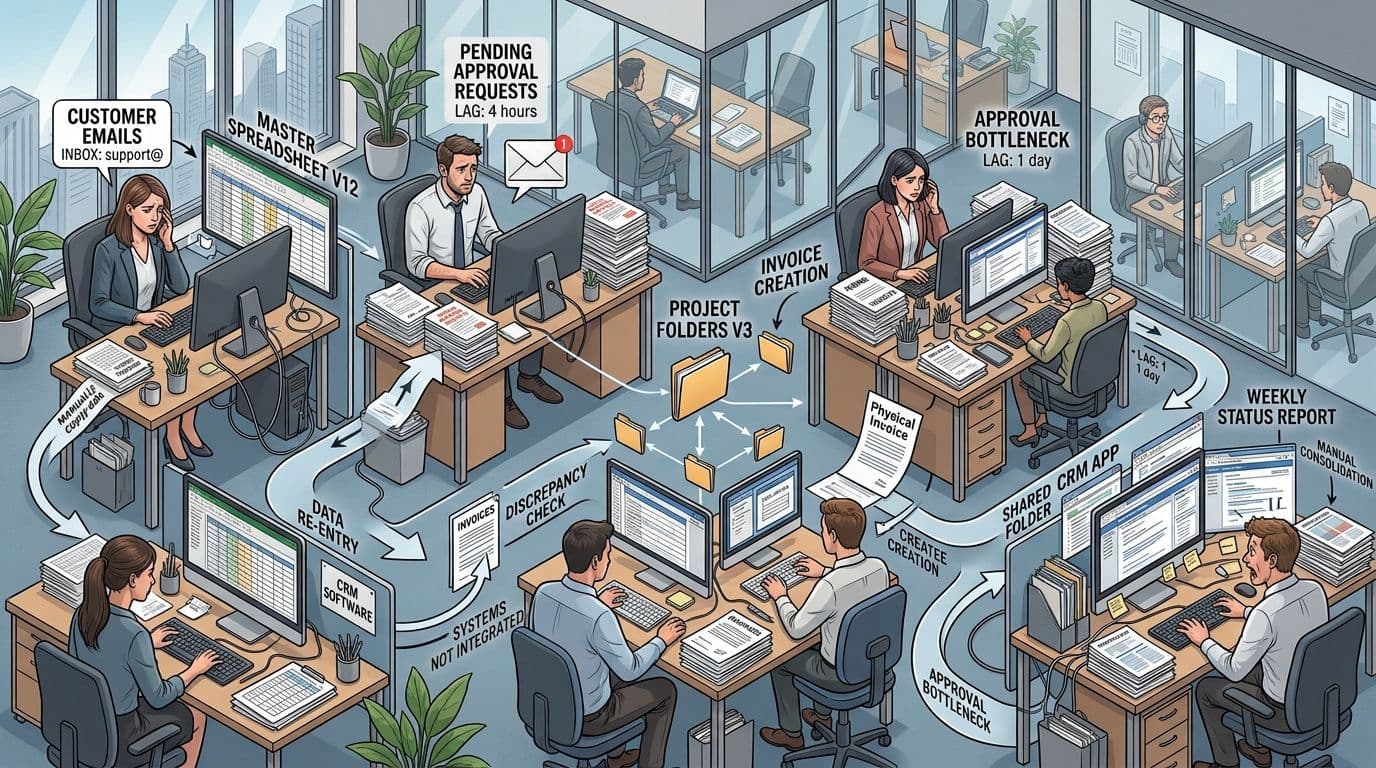
Manual work rarely appears as one large operational problem. It builds gradually across dozens of small tasks.
An employee copies contact information from an email into a customer relationship management platform. Another person downloads an attachment, renames it, saves it to a shared folder, and notifies a manager. A sales representative creates follow-up tasks after every call. An operations coordinator combines information from several spreadsheets to prepare a weekly report.
Each task may take only a few minutes. The larger cost appears when that task is repeated across hundreds of customers, documents, transactions, and employees.
This creates a manual-work tax that affects the entire business.
Employees Spend Time Moving Information Instead of Using It
Information may already exist in an email, form, invoice, transcript, document, or application. However, an employee still has to read it, interpret it, and enter it into another system.
The work adds little direct customer value, but the process cannot continue until someone completes it.
Important Tasks Depend on Memory
A growing company may rely on employees to remember follow-ups, check shared inboxes, update statuses, request approvals, or notify another department.
This may work when transaction volume is low. It becomes less dependable as the team, customer base, and workload grow.
Managers Lose Operational Visibility
When employees manage work differently, leadership cannot easily determine:
- How many requests are waiting
- Where delays are occurring
- Which customers need responses
- Whether required approvals were completed
- Why work must be repeated
- Which processes consume the most employee time
- How often exceptions occur
- Whether service standards are being met
The result is not only inefficiency. It is limited visibility into how the business actually operates.
Growth Creates More Handoffs
A small team may solve problems through direct conversations. As the business grows, tasks move between sales, customer service, finance, operations, fulfillment, and management.
Every handoff creates an opportunity for:
- Missing information
- Delayed action
- Duplicate work
- Unclear ownership
- Inconsistent customer communication
- Records being updated in one system but not another
Employees Create Unofficial Workarounds
When existing software does not support the real workflow, employees may create additional spreadsheets, personal reminders, shared inbox folders, copied templates, and manual checklists.
These workarounds can solve an immediate problem, but they make the process harder to monitor, secure, train, and scale.
Signs That Manual Work Is Slowing the Business
A business may be ready for automation when several of the following conditions appear:
- The same information is entered into multiple systems.
- Employees regularly copy information from emails or documents.
- Customer follow-ups depend on personal reminders.
- Staff repeatedly rename, sort, or move files.
- Managers spend hours assembling recurring reports.
- Approvals are delayed because requests are difficult to track.
- Customers must repeat information to different departments.
- Work is frequently returned because required information is missing.
- Employees maintain private spreadsheets to manage company processes.
- Service quality changes depending on which employee handles the request.
- New employees require extensive training on repetitive administrative steps.
- The company adds administrative staff whenever transaction volume increases.
- Customers wait while employees search for information.
- Managers cannot determine where a request is in the process.
- Small mistakes create downstream corrections and rework.
These signs do not automatically mean AI is required. Some problems can be solved through clearer procedures, better application configuration, or conventional workflow automation.
The purpose of an automation assessment is to determine which type of improvement fits each process.
What Are AI Automation Services?
AI automation services help a business analyze, redesign, build, integrate, and maintain workflows that combine software rules, artificial intelligence, and human oversight.
A complete engagement may include:
- Workflow discovery
- Process documentation
- Opportunity prioritization
- Automation design
- Software integration
- AI implementation
- Testing
- Deployment
- Employee training
- Performance monitoring
- Ongoing improvement
The objective is not simply to install an automation tool. It is to improve how work moves through the business.
Workflow Discovery
The automation team studies how a process currently operates.
This includes identifying:
- What starts the process
- Which information enters the workflow
- Which employees participate
- Which systems are used
- What decisions are made
- Where delays occur
- Which steps are repeated
- What exceptions appear
- What outcome completes the process
The documented procedure often differs from what employees actually do. Interviews, task observation, system records, and process analysis can reveal those differences.
Microsoft’s process mining guidance explains how operational data can be used to understand real workflows, identify inefficiencies, investigate root causes, and locate opportunities for improvement.
Opportunity Prioritization
Not every manual task deserves immediate automation.
A provider should evaluate each opportunity according to factors such as:
- Task volume
- Time spent per task
- Process consistency
- Error frequency
- Data availability
- Customer impact
- Integration complexity
- Security requirements
- Exception rate
- Business value
The goal is to select a meaningful starting point rather than automate the most visible inconvenience.
Automation Design
The provider defines what the system will do and what employees will continue to do.
A complete design should document:
- Workflow trigger
- Required inputs
- Data validation
- AI interpretation
- Business rules
- System actions
- Human approval points
- Exception handling
- Notifications
- Audit records
- Performance metrics
- Manual recovery steps
Development and Integration
The automation must connect with the applications the business already uses.
These may include:
- Customer relationship management systems
- Accounting software
- Email platforms
- Forms
- Project management applications
- Customer support systems
- Cloud storage
- Databases
- Scheduling tools
- E-commerce platforms
- Internal dashboards
- Custom web applications
- Mobile applications
The Microsoft Power Automate documentation provides guidance for cloud flows, desktop flows, approvals, repetitive task automation, and integrations between business applications.
AI Implementation
Artificial intelligence becomes useful when a workflow must interpret information rather than simply follow fixed rules.
An AI component may:
- Classify an incoming message
- Extract information from a document
- Summarize a conversation
- Identify the intent of a customer request
- Match a request with an internal category
- Draft a response
- Detect missing information
- Recommend a next action
- Search approved company knowledge
- Flag an unusual transaction for review
Testing
The provider should test:
- Normal workflow cases
- Incomplete inputs
- Duplicate records
- Unusual document formats
- Integration failures
- Permission boundaries
- Notification timing
- Exception paths
- AI output quality
- Human review steps
- Recovery procedures
Testing should use realistic business examples rather than only ideal inputs.
Deployment and Monitoring
The automation is introduced into the business, often through a controlled pilot.
After launch, the team should monitor:
- Successful completions
- Failed actions
- Human corrections
- Processing time
- Integration errors
- Unusual inputs
- Approval delays
- AI output quality
- Operating cost
- Employee adoption
- Customer impact
Automation is an operational system. It requires ownership and maintenance after it goes live.
AI Automation Is Not One Technology
The phrase “AI automation” can describe several different approaches. Growing businesses should understand the differences because the most advanced option is not always the most appropriate.
Rules-Based Workflow Automation
Rules-based automation follows predictable instructions.
Examples include:
- When a website form is submitted, create a CRM record.
- When an invoice is approved, notify accounting.
- When a lead reaches a defined stage, assign a follow-up task.
- When a contract expiration date approaches, send a reminder.
- When a customer selects a service, route the request to the appropriate team.
This approach works well when inputs and decisions are structured.
Robotic Process Automation
Robotic process automation, commonly called RPA, can imitate actions that a person performs through a software interface.
It may:
- Open an application
- Copy information
- Enter data
- Download a report
- Rename a file
- Move information between legacy systems
- Complete a repeated sequence of clicks
RPA can be useful when an important system does not provide a reliable integration method. However, interface changes can affect automations that depend on specific screen layouts.
AI-Assisted Automation
AI-assisted automation handles information that requires interpretation.
For example, a conventional workflow may detect that a new email arrived. AI may determine what the email is about, extract relevant information, prepare a summary, and recommend where it should be routed.
A person can then review the result before the next action occurs.
Document Automation
Growing businesses often process invoices, purchase orders, forms, applications, contracts, receipts, reports, and customer documents manually.
Google Cloud Document AI is designed to convert unstructured document content into usable data through capabilities such as text extraction, classification, form parsing, and document splitting.
A document automation workflow may:
- Receive a document.
- Identify the document type.
- Extract relevant fields.
- Validate required information.
- Update a database or business application.
- Route uncertain results for human review.
- Store the original document and processing record.
AI Agents
An AI agent can use tools, information, and defined instructions to complete a multistep task.
For example, an agent might review an incoming customer request, retrieve account details, search approved company knowledge, prepare a response, create a task, and request employee approval.
Agents can support more flexible workflows than basic rules, but that flexibility creates additional risk. Their permissions, available tools, data access, and ability to take actions must be carefully limited.
Human-in-the-Loop Automation
Human-in-the-loop automation sends uncertain, sensitive, or high-impact decisions to a person.
Examples include:
- Approving a refund
- Reviewing an unusual invoice
- Confirming extracted contract information
- Approving a customer-facing response
- Reviewing a low-confidence classification
- Authorizing a financial action
- Confirming a personnel-related decision
This approach often provides a practical balance between efficiency and control.
Where Growing Businesses Can Use AI Automation
The best use cases vary by industry, but several workflow categories appear across many growing companies.
Lead Intake and Sales Follow-Up
Sales teams often receive leads through website forms, email, phone calls, live chat, advertising platforms, and referrals.
A manual process may require someone to:
- Read the inquiry
- Create a CRM contact
- Categorize the opportunity
- Assign an owner
- Prepare a response
- Schedule a reminder
- Update a spreadsheet
- Notify a manager
An automated workflow can complete much of this process.
It may:
- Capture the inquiry.
- Validate the contact information.
- Identify the requested service.
- Summarize the customer’s needs.
- Create or update the CRM record.
- Assign the lead according to territory or expertise.
- Prepare a personalized response.
- Create a follow-up task.
- Notify the assigned employee.
- Escalate high-priority opportunities.
The sales representative remains responsible for the relationship and final communication.
Customer Service Triage
A growing customer service team may receive a mixture of questions, complaints, requests, account changes, and urgent issues.
AI automation can:
- Identify the customer’s intent
- Detect urgency
- Retrieve account information
- Search approved support content
- Prepare a response
- Route the issue to the correct queue
- Identify missing information
- Escalate sensitive cases
- Update the ticket status
- Create follow-up tasks
The objective is not to prevent customers from reaching people. It is to reduce routing delays and give employees the context needed to respond efficiently.
Document Intake and Data Entry
Document processing is often a strong automation opportunity because the work is repetitive, measurable, and connected to downstream systems.
Potential documents include:
- Invoices
- Purchase orders
- Applications
- Customer forms
- Service reports
- Receipts
- Shipping documents
- Product sheets
- Insurance documents
- Contracts
- Inspection reports
A document workflow can classify the file, extract relevant fields, validate the information, update a system, and request human review when confidence is low.
Finance and Administrative Work
Finance teams may spend substantial time checking documents, updating statuses, preparing recurring reports, and requesting approvals.
Automation can assist with:
- Invoice intake
- Expense categorization
- Approval routing
- Payment reminders
- Purchase-order matching
- Recurring report preparation
- Missing-document alerts
- Account reconciliation support
- Vendor onboarding
- Subscription renewal notices
Financial controls should remain part of the design. High-value or unusual transactions may require explicit approval.
Operations and Order Management
Businesses handling products, appointments, projects, or field services often coordinate information across several systems.
Automation can:
- Create work orders
- Confirm appointments
- Update order statuses
- Notify customers about delays
- Assign field employees
- Request missing information
- Create shipping documentation
- Update inventory records
- Escalate fulfillment issues
- Prepare daily operations summaries
The largest benefit may come from improving handoffs between departments rather than optimizing one isolated task.
Reporting and Management Visibility
Managers often assemble reports manually because information is spread across several systems.
Automation can collect data, standardize fields, update dashboards, identify missing records, and distribute summaries on a schedule.
AI may also help summarize operational changes, but managers should be able to inspect the underlying data rather than rely only on generated explanations.
Employee Onboarding and Internal Support
Growing teams repeatedly answer questions about processes, tools, policies, and responsibilities.
Automation may:
- Create employee accounts
- Assign onboarding tasks
- Schedule training
- Collect required forms
- Send reminders
- Route access requests
- Search approved internal documentation
- Track completion
- Notify managers about missing steps
Sensitive personnel decisions should remain under appropriate human control.

What Makes a Process Suitable for Automation?
A process does not need to be simple, but it should be understandable.
The strongest candidates usually share the following characteristics.
The Task Happens Frequently
Automating a task that occurs hundreds of times may create more value than automating an inconvenient task that occurs once each quarter.
The Steps Are Reasonably Consistent
The process may contain exceptions, but the normal path should be identifiable.
When every employee completes the work differently, the business may need to standardize the process before automating it.
The Required Information Is Available
The automation must be able to access the necessary inputs through forms, databases, documents, email, APIs, or approved business applications.
The Result Can Be Measured
The business should be able to determine whether the automation improved:
- Completion time
- Accuracy
- Customer response time
- Employee effort
- Customer experience
- Throughput
- Visibility
- Operating cost
- Exception rate
The Process Has a Clear Owner
Someone inside the business should be accountable for the workflow.
This owner can answer questions, approve changes, review exceptions, and monitor performance after launch.
Errors Can Be Detected and Corrected
The automation should not continue silently when information is missing or an action fails.
It should log the issue, notify the appropriate person, and provide a recovery path.
An Automation Opportunity Scorecard
Growing businesses can use a simple scorecard to prioritize potential projects.
Rate each category from 1 to 5.
| Evaluation Category | Low Score | High Score |
|---|---|---|
| Frequency | The task rarely occurs | The task occurs many times each day or week |
| Employee effort | The task takes little time | The task consumes substantial staff time |
| Consistency | Every case is different | Most cases follow a repeatable path |
| Data availability | Information is difficult to access | Inputs are digital and reasonably structured |
| Error impact | Mistakes have little effect | Mistakes create delays, rework, or customer problems |
| Customer impact | Customers rarely notice the process | The process directly affects response or delivery |
| Measurement | Success is difficult to define | Performance can be measured clearly |
| Integration readiness | Systems are closed or undocumented | Applications provide reliable integration options |
| Exception rate | Most cases require judgment | Most cases follow the normal workflow |
| Business priority | Improvement is optional | The process is limiting growth |
A high score does not automatically justify complete automation. It indicates that the process deserves further analysis.
What Should Not Be Automated?
Automation should not be treated as a requirement for every task.
Some work should remain human-led.
Processes That Are Not Understood
Automating an unclear process can make confusion move faster.
The business should first document the workflow, identify ownership, remove unnecessary steps, and establish consistent rules.
Tasks That Rarely Occur
The cost of designing, testing, and maintaining an automation may exceed the value of automating an infrequent task.
Decisions Requiring Substantial Judgment
AI can organize information or prepare a recommendation, but a person may need to make the final decision when context, empathy, negotiation, ethics, or significant consequences are involved.
Unstable Processes
A workflow that changes every week may not be ready for automation.
The business may need to complete an operational redesign before implementing technology.
Tasks With Inaccessible Inputs
An automation cannot operate reliably if essential information exists only in private notes, informal conversations, or inconsistent files.
Sensitive Actions Without Controls
An AI system should not receive broad authority to issue refunds, move money, delete records, change customer accounts, or make employment decisions without appropriate restrictions and approvals.
Broken Customer Experiences
Automating a poor customer journey does not improve it.
The business should first determine what the customer needs and remove unnecessary friction.
A Practical AI Automation Implementation Roadmap
A growing business does not need to automate the entire company at once.
A staged roadmap reduces risk and creates evidence for later investment.
Phase 1: Discover the Real Workflow
Begin with one operational area.
Interview the employees who perform the work and document:
- What starts the process
- What information is received
- Where the information is stored
- Which applications are used
- Which decisions are made
- Which steps are repetitive
- Where employees wait
- What mistakes occur
- Which exceptions require judgment
- What completes the process
Compare the official procedure with the actual process.
Phase 2: Establish Baseline Measurements
Measure the current workflow before changing it.
Useful baseline metrics include:
- Requests processed per week
- Average completion time
- Employee minutes per request
- Percentage completed on time
- Number of corrections
- Number of customer follow-ups
- Approval delay
- Exception frequency
- Abandonment rate
- Cost per completed transaction
Without a baseline, the business may know that the automation feels faster but be unable to demonstrate its value.
Phase 3: Simplify the Process
Remove unnecessary steps before developing the automation.
Questions to ask include:
- Is this approval still necessary?
- Is the same information collected more than once?
- Can one system become the official record?
- Can the form request better information?
- Can a status or category be standardized?
- Can an unnecessary handoff be removed?
- Can a rule be clarified?
- Can the normal path be separated from exceptions?
Simplification often produces immediate improvement and makes the later automation more reliable.
Phase 4: Design Human and Automated Responsibilities
Label each step as:
- Fully automated
- AI-assisted
- Human-reviewed
- Human-led
- Exception-only
This creates a clear operating model.
For example, an invoice workflow might be designed as follows:
- The system receives the invoice automatically.
- AI extracts the vendor, amount, date, and reference number.
- Rules compare the information with existing records.
- Normal invoices move to the appropriate approval queue.
- Missing or unusual information is routed to an employee.
- A manager approves invoices above a defined threshold.
- The final status is recorded automatically.
- The workflow creates an audit record.
Phase 5: Build a Controlled Pilot
Begin with a limited volume, department, document type, or customer group.
The pilot should test:
- Normal cases
- Incomplete information
- Duplicate records
- Unusual formats
- Integration failures
- Employee corrections
- Permission boundaries
- Notification timing
- Customer-facing output
- Recovery procedures
The purpose of the pilot is to identify operational issues before the automation handles the full workload.
Phase 6: Train Employees
Employees need to understand:
- What the automation does
- What it does not do
- Which information it uses
- How to review results
- How to correct an error
- How to report a problem
- When to override the workflow
- Who owns the process
- What will be measured
Poor adoption can make a technically successful automation ineffective.
Phase 7: Measure and Improve
Compare the pilot with the baseline.
Review:
- Time saved
- Completion time
- Error frequency
- Employee corrections
- Customer response time
- Automation failures
- Exception volume
- Employee satisfaction
- Operating cost
- Business outcome
The results should determine whether the workflow is expanded, adjusted, or discontinued.
Phase 8: Create an Automation Portfolio
After the first workflow produces measurable value, the business can prioritize additional opportunities.
A portfolio view prevents departments from developing disconnected automations without shared standards.
The business should maintain a record of:
- Automation owner
- Purpose
- Systems involved
- Data accessed
- Approval requirements
- Performance indicators
- Failure procedure
- Vendor dependencies
- Last review date
- Planned improvements
How to Measure AI Automation ROI
Automation returns should be measured through more than estimated labor savings.
Employee Capacity
Calculate the time previously spent completing the manual steps.
A practical estimate is:
Monthly capacity released = Monthly task volume × Average manual minutes removed
This does not necessarily represent direct cash savings. The value may appear as faster customer service, increased transaction capacity, reduced overtime, or more time for revenue-generating work.
Cycle Time
Measure the time from the beginning of the process to completion.
Automation may reduce waiting time even when the manual task itself was short.
Error and Rework Rate
Track how often work must be corrected, re-entered, returned, or repeated.
The cost of a mistake may include employee time, customer frustration, delayed payment, or a failed downstream process.
Customer Response Time
For sales and service workflows, faster response may be more valuable than direct administrative savings.
Measure the time between customer contact and meaningful action.
Throughput
Determine whether the same team can process more requests, customers, transactions, or documents without reducing quality.
Exception Rate
Track the percentage of cases the automation cannot complete normally.
A high exception rate may indicate poor input quality, unclear business rules, weak AI performance, or an unsuitable process.
Adoption
Measure whether employees use the workflow correctly or bypass it.
Low adoption may reveal a usability problem, inadequate training, missing functionality, or limited trust.
Operating Cost
Include:
- Software licenses
- AI model usage
- Cloud services
- Integration tools
- Monitoring
- Maintenance
- Employee review time
- Vendor support
A workflow should not be considered successful merely because it functions technically.

Data Security and AI Governance Must Be Built Into the Workflow
Automation can move information quickly between systems. That makes permissions, access controls, and data governance essential.
A growing business should know:
- What information the automation receives
- Which systems it can access
- Where information is stored
- Which third parties process the data
- How long records are retained
- Who can change the workflow
- Which actions require approval
- How errors are logged
- How activity is audited
- How access is removed when roles change
- What happens when a connected service fails
The NIST AI Risk Management Framework provides voluntary guidance for incorporating trustworthiness and risk management into the design, development, use, and evaluation of AI systems.
For a growing business, responsible AI automation can be translated into practical controls.
Limit Access
The automation should receive only the permissions required to complete its task.
A customer support assistant does not need unrestricted access to every financial or personnel record.
Separate Suggestions From Actions
An AI-generated recommendation is different from an authorized business action.
The system may prepare a refund recommendation, but a person or approved business rule should determine whether the refund is issued.
Protect Sensitive Information
Sensitive customer, employee, financial, or operational information should not be entered into unapproved AI tools.
The business should understand the data-handling terms of every connected service.
Maintain Audit Records
Important actions should record:
- What happened
- When it occurred
- Which system initiated it
- Which data was used
- Whether a person approved it
- Whether the action succeeded
- What exception occurred
Monitor Changes
AI models, APIs, authentication methods, and business processes can change.
The automation should be reviewed after major technical or operational changes.
Provide a Manual Fallback
Employees should know how to continue the process when the automation or a connected system is unavailable.
How to Choose an AI Automation Services Provider
The right provider should understand business operations as well as software development.
A provider that begins with tools before understanding the workflow may automate the wrong problem.
Look for a team that can:
- Map the current process
- Identify unnecessary steps
- Select the appropriate automation method
- Integrate existing applications
- Test AI with realistic business data
- Create human review points
- Build monitoring and recovery procedures
- Measure business results
- Support the workflow after launch
Ask About Workflow Discovery
Questions should include:
- How will the current process be documented?
- Will the team interview employees who perform the work?
- How will bottlenecks and exceptions be identified?
- How will the provider distinguish a process problem from a technology problem?
- What will be delivered after discovery?
Ask How Opportunities Are Prioritized
The provider should explain why one workflow should be automated before another.
The decision should consider business value, frequency, reliability, complexity, customer impact, and risk.
Ask About AI Evaluation
The provider should explain:
- What representative examples will be tested
- How output quality will be measured
- How incorrect results will be identified
- How human corrections will be recorded
- What level of performance is acceptable
- How changes will be evaluated after launch
Ask About Integration Experience
Determine whether the provider can work with:
- Existing SaaS applications
- Custom databases
- APIs
- Webhooks
- Cloud services
- Legacy systems
- Email platforms
- Document repositories
- Customer portals
- Mobile applications
Ask About Ownership
The agreement should clarify ownership of:
- Source code
- Workflow configurations
- Prompt instructions
- Integration credentials
- Documentation
- Data
- Evaluation examples
- Cloud accounts
- Automation platform accounts
- Custom software components
Ask About Monitoring and Support
The provider should explain:
- How failed workflows are detected
- Who receives alerts
- How incidents are handled
- How updates are tested
- What support is included
- How model or API changes are managed
- How performance will be reviewed
Common AI Automation Mistakes
Automating Before Standardizing
A business may have three employees completing the same task in three different ways.
The company should first determine the correct workflow. Otherwise, the automation team must choose among inconsistent practices.
Starting With the Most Complicated Process
A highly complex, sensitive, and exception-heavy workflow may be a poor first project.
An early automation should be measurable, useful, and controlled.
Removing Human Review Too Early
An automation may perform well during testing but still encounter unfamiliar customer requests, documents, or operating conditions.
Human review provides a safety mechanism while the system accumulates real-world evidence.
Ignoring Employee Experience
Employees who perform the work often understand the exceptions better than management.
Excluding them can result in a workflow that appears efficient on paper but creates additional work in practice.
Automating Poor Input
Incomplete forms, inconsistent categories, duplicate customer records, and disorganized documents will affect the automation.
Improving input quality may be necessary before applying AI.
Measuring Only Labor Savings
An automation may create value through faster service, increased capacity, improved consistency, or better visibility.
A narrow labor-saving estimate may overlook the main business benefit.
Building Without an Owner
Every automation needs someone responsible for performance, changes, approvals, and exceptions.
Without ownership, small problems may remain unresolved until the workflow becomes unreliable.
Creating Isolated Automations
Department-level automations may use conflicting data, duplicate records, or create incompatible processes.
The company should establish shared standards for data, access, monitoring, and documentation.
A Readiness Checklist for Growing Businesses
Before starting an automation project, confirm the following.
Business Readiness
- The problem affects an important business outcome.
- The process occurs frequently enough to justify improvement.
- A process owner has been identified.
- Employees who perform the work are available for discovery.
- Management supports the operational change.
- Success can be measured.
Process Readiness
- The current workflow can be documented.
- The normal path is reasonably consistent.
- Major exceptions are known.
- Unnecessary steps can be removed.
- Approval rules are defined.
- A manual fallback is possible.
Data Readiness
- Required information is available digitally.
- Important fields can be identified.
- Data sources are approved.
- Duplicate and missing information can be handled.
- Sensitive information has been classified.
- Retention requirements are understood.
Technical Readiness
- Required applications can be integrated.
- Account ownership is clear.
- Test and production environments can be separated.
- Access permissions can be limited.
- Logging and monitoring can be implemented.
- Technical support responsibilities are defined.
AI Readiness
- Representative examples are available.
- Expected outputs can be described.
- Quality can be evaluated.
- Low-confidence results can be identified.
- Human review points are defined.
- AI operating costs can be monitored.
FAQ
What Are AI Automation Services?
AI automation services help businesses identify repetitive workflows, redesign processes, connect applications, develop AI-supported systems, test outputs, deploy automations, and monitor performance. The service may combine workflow automation, RPA, document processing, AI agents, data pipelines, and custom software integrations.
How Does AI Automation Reduce Manual Work?
AI automation reduces manual work by receiving information, interpreting it, updating systems, routing tasks, generating drafts, requesting approvals, and recording outcomes. Employees continue to handle exceptions, important decisions, customer relationships, and quality control.
What Business Processes Can Be Automated With AI?
Common opportunities include lead intake, sales follow-up, customer service triage, document processing, invoice intake, order updates, appointment reminders, reporting, employee onboarding, internal knowledge search, and approval routing. Suitability depends on process consistency, volume, data availability, risk, and measurable value.
What Is the Difference Between AI Automation and Regular Automation?
Regular automation follows predefined rules and works best with structured inputs. AI automation can interpret less structured information such as documents, messages, images, and conversations. Many practical systems combine fixed business rules with AI interpretation and human review.
Does AI Automation Replace Employees?
The practical objective is usually to reduce repetitive administrative work rather than remove every employee from a process. People remain responsible for judgment, exceptions, customer communication, approvals, problem-solving, and workflow oversight.
Is AI Automation Only for Large Companies?
No. Growing businesses can automate focused workflows without rebuilding their entire technology environment. A well-selected project can begin with one repeated process, a limited group of users, and a measurable pilot.
How Long Does an AI Automation Project Take?
The timeline depends on process complexity, data quality, integrations, security requirements, exception volume, and testing needs. A focused workflow using accessible systems may be implemented faster than a cross-department process involving legacy software and sensitive information.
How Much Does AI Automation Cost?
Cost depends on discovery, workflow complexity, custom development, integration requirements, AI usage, software licenses, infrastructure, testing, monitoring, and support. A useful proposal should separate implementation costs from ongoing operating expenses.
How Should a Business Choose Its First Automation Project?
Choose a process that is frequent, repetitive, measurable, reasonably consistent, and important to employees or customers. Avoid beginning with the company’s most sensitive or exception-heavy process unless the necessary controls and expertise are already available.
How Can a Company Measure Whether Automation Is Successful?
Compare the new process with a documented baseline. Measure cycle time, employee effort, errors, rework, customer response time, throughput, exceptions, adoption, operating cost, and the business outcome the workflow was intended to improve.
What Happens When the AI Makes a Mistake?
The workflow should identify uncertainty, route exceptions to a person, record corrections, and prevent unsupported actions. High-impact processes should include clear approval controls, audit records, and a manual recovery procedure.
Can AI Automation Work With Existing Business Software?
Often, yes. Automations can connect applications through APIs, webhooks, integration platforms, databases, file transfers, or RPA. The available method depends on the technical capabilities and access controls of each system.
Final Thoughts
Growing businesses often reach a point where employees are no longer limited by customer demand. They are limited by the administrative work required to manage that demand.
The strongest strategy is not to automate everything. It is to identify one important workflow, understand how it operates, simplify it, establish a baseline, define human oversight, and launch a controlled pilot.
Well-designed AI workflow automation solutions can help teams spend less time copying information, checking routine statuses, and managing preventable handoffs and more time serving customers, improving operations, and supporting sustainable growth.
Related Articles



Get started today and unlock the power of our solutions.
Try Inovetix free and see how simple smarter selling can be - no credit card required.
Have a project?
Let's connect!
Inovetix brings your team, clients, and data into one powerful workspace, turning everyday clutter into a smooth, focused rhythm of growth.
1:1 Call
Want to discuss your vision over a call? Book a free call with us and see how we can help you.